Start with Pencil2D for hand-drawn cartoons, Blender for a character that needs a 3D rig, or Canva for a short animation built from a template. If you already have a recording and need a name or diagram to appear when someone speaks, try Clipchamp for a preset title or ChatCut for an editable graphic. Nine options below offer ongoing free access. The tenth, After Effects, belongs on the list only if a seven-day trial covers your project.
ChatCut makes one of the editors in this guide. We compared official documentation on November 20, 2026, looking at how you create motion, where the software runs, and what happens at export. We exported a five-second diagram and revised a four-second logo in ChatCut Desktop. The six-second card later in the guide is a worked example based on the Pencil2D, Blender and Fusion documentation.
Best free animation software by task
| Tool | Best fit | Where to work | What the free option covers |
|---|---|---|---|
| Pencil2D | Draw a character one pose at a time | Windows, macOS, Linux, FreeBSD | Open-source app, including commercial use |
| Cavalry | Repeat and animate shapes in a pattern | macOS, Windows | Desktop app included with a free Canva account |
| Blender | Rig a 3D character or draw in a 3D scene | Windows, macOS, Linux | Open-source app, including commercial use |
| Animaker | Animate a stock character speaking | Browser, also available on iOS | Up to three HD downloads per month per its video-maker FAQ, with a watermark |
| Canva | Animate a logo, page or social graphic | Browser or mobile app | Watermark-free video with Free assets at the default MP4 quality |
| Renderforest | Put a logo into a ready-made intro | Browser | Free HD video carries a watermark |
| DaVinci Resolve Fusion | Build titles and effects on footage | macOS, Windows, Linux | Fusion is included in free Resolve. Some effects require Studio |
| Clipchamp | Place a preset animated title over a clip | Browser or Windows app | Personal Free exports up to 1080p without a watermark using free assets and features |
| ChatCut | Time a callout to a spoken explanation | Browser, macOS 13+, Windows 10+ x64 | Core editor and local rendering. Free exports have no watermark. Cloud rendering has an account allowance |
| Adobe After Effects | Open an After Effects project for a short job | macOS, Windows | Seven-day trial, then paid unless canceled |
How we evaluated these tools
We used the starting material to group the tools. A pencil sketch calls for a drawing surface and a way to see the previous pose. A rigged character needs bones that can move a mesh. A company logo may need only a template with room for a wordmark. Once a speaker is on screen, the deciding question is how to place and revise a graphic without losing its timing against the recording.
For each option, we checked the license or account requirement and the restriction that could change a publishing decision. A watermark on every free video has a different consequence from one on a particular stock element you can replace. For more on video overlays, see our motion graphics software comparison. For animation generated from a text or image prompt, see the AI video animation guide.
Free 2D animation software for desktop
1. Pencil2D for hand-drawn 2D cel animation
Choose Pencil2D if the movement comes from your drawings. Sketch a first pose on a bitmap layer, move forward on the timeline, then draw the next pose. Onion skinning shows earlier or later drawings faintly behind the active one. That makes it easier to see whether a hand moved a little between poses or jumped halfway across the frame. The user manual walks through this using a bouncing ball.
Pencil2D supports raster and vector drawing on Windows, macOS, Linux and FreeBSD. Its open-source license permits commercial use. Camera keyframes can move the view over an existing drawing, which is useful for a pan across a painted background. For a finished clip, the movie exporter defaults to MP4. For a sequence you plan to composite in another editor, the project recommends PNG frames. Pencil2D export guide
2. Cavalry for procedural 2D motion design
Choose Cavalry when the same movement repeats across a design. For a row of dots that light up in order, create one dot and use the Duplicator to distribute copies. Its Shape Time Offset control can shift the timing of each copy. You can change the spacing of the row or the delay between dots without animating every dot separately. Cavalry Duplicator manual
Cavalry runs as a separate Mac or Windows desktop app. Download the installer, launch the app and sign in with a Canva account. Canva documents access across its plans, including Free. Cavalry also confirms that its former Professional features are included. For a team making a repeating chart or a series of animated brand patterns, the time spent setting up the first shape can pay off when the layout changes. Canva setup guide · Cavalry release notes
Free 3D and hybrid animation software
3. Blender for 3D and Grease Pencil
Blender suits projects where the camera, character and background move independently. An armature is a skeleton made of bones. Attach a character mesh to it and you can pose the character across a sequence. Blender runs on Windows, macOS and Linux. Its GPL license applies to the software, and you can sell the artwork you make with it. Armatures · Blender license guide
For hand-drawn work with camera movement, choose File → New → 2D Animation. The template opens a Grease Pencil workspace with line and fill layers. Strokes occupy 3D space, so you can place a foreground drawing closer to the camera than the background. A sideways camera move then makes the foreground appear to travel farther. This is a reason to learn Blender even if you intend to draw every character by hand. Grease Pencil introduction
Free animation makers online
4. Animaker for browser character explainers
Animaker is a fit for an explainer in which a character needs to speak or move between points. The editor offers a character builder, facial expressions and automatic lip-sync. Its Smart Move control lets you adjust an asset’s path and preview the movement. An iOS app is also available. Animaker features · Smart Move instructions
Animaker’s video-maker FAQ lists up to three HD downloads per month on Free. The free video carries a watermark, including when you supply your own artwork. Animaker says all its paid plans remove the mark. It also advertises a separate seven-day trial of paid features. If a client needs a clean video, decide on the paid export before spending time on character design. Video-maker FAQ · Plan and trial details
5. Canva for template animations and social clips
Canva works well when the design is already close to the final layout. Start with an animated logo template or a social graphic. To make an element follow a particular route, select it, choose Animate → Create an Animation, then drag it along the path. A logo that slides into place is a good first project because you can judge the timing against a fixed headline. Motion path instructions
A Free account can download watermark-free video when the design uses only free elements, footage and audio. A Pro element carries a watermark on Free. Swap it for a Free asset or check the license for that item. Canva supports MP4 and GIF. For a free MP4, keep the default quality setting because changing the output quality can trigger an upgrade. Video editor FAQ · Content licensing · Download settings
6. Renderforest for browser scene and intro presets
Use Renderforest when you have a logo file and want to see it in a finished intro design. Browse the logo animation templates, upload the artwork, then adjust the text or colors offered by the template. Preview your actual logo before committing to the design. A long wordmark and a square icon can sit quite differently in the same opening shot. Logo animation maker
Renderforest lists HD videos with a watermark on Free. For one client intro, its help center describes a pay-per-export option for a single watermark-free video. A paid subscription is the other route. This matters if you only need the intro once and want to compare the price of that file with a subscription. Plans · Export and payment FAQ
Motion graphics over recorded video
7. DaVinci Resolve Fusion for node-based compositing
Fusion is part of free DaVinci Resolve on macOS, Windows and Linux. A node performs one operation, such as creating text or combining it with a shot. Connect those nodes to build a title, then use the Spline Editor to control how quickly it moves between keyframes. This is useful when a name needs to ease to a stop under a speaker or a label needs to follow the subject. Fusion overview
Check the edition before building around an effect. Blackmagic lists Magic Mask, the DaVinci AI Neural Engine and additional Resolve FX under Studio. On November 20 its US store showed Studio at US$236, reduced from US$295, for the software purchase. The free application already includes the Fusion page used for the title workflow here. Compare Resolve editions
8. Clipchamp for 1080p watermark-free timeline graphics
If you need a name and role to appear over footage, Clipchamp’s animated title presets give you a short route from recording to finished video. Open the editor in Edge or Chrome, or use the Windows app. Put the title over the clip and trim its duration to the part where the speaker introduces themselves. Supported platforms · Animated text and title features
For personal accounts, Microsoft includes free stock, core editing tools and watermark-free exports up to 1080p. A qualifying Microsoft 365 subscription adds features such as 4K export, premium stock, premium filters and effects, and the brand kit. Benefits vary by subscription. If 1080p is sufficient, use personal footage and free assets when you assemble the title. Microsoft’s personal plan rules
9. ChatCut for in-video motion graphics
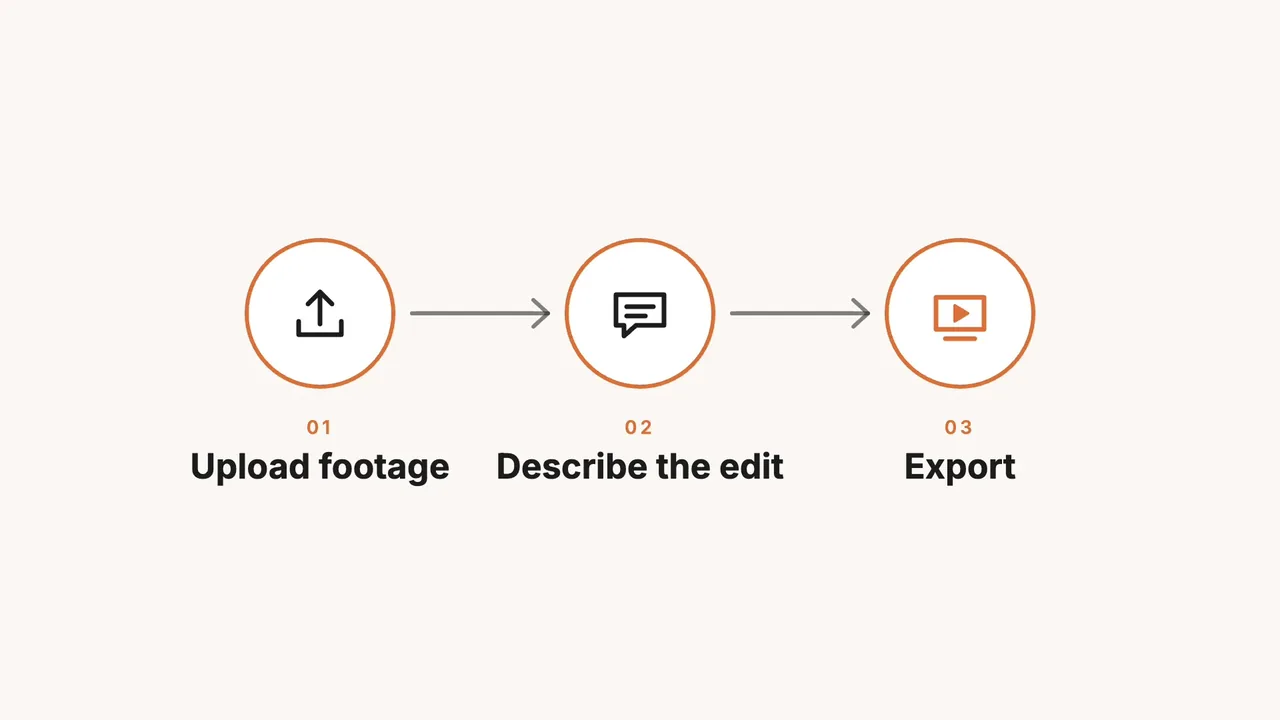
We asked Claude Code, an external agent connected to ChatCut Desktop, to make a diagram a viewer could read in five seconds. The agent wrote the motion graphics code for both examples, placed each graphic on a Desktop timeline and rendered it locally. Neither example used AI generation for images, video or audio.
A ring draws around the upload icon, its label rises into view, and an arrow leads to the next step. By 3.4 seconds all three labels are in place and stay visible through the end. After checking eight preview frames, we moved the whole diagram down 40 pixels to balance the space above and below it.
For a second test, we asked for a logo reveal, then changed its entrance and color in a follow-up instruction.
The cup scaled up in place, three curls of steam appeared, and the letters in “Northwind” rose into view one by one. The full logo held from 2.5 seconds to the end.

The agent changed the cup’s motion in the code so it entered from the left with a tilt and settled upright. It changed the accent through an editable color property on the timeline. That one adjustment recolored the steam, cup stripe, saucer and underline.

These two examples shared a test project with one other animation. The balance was 154.13 ChatCut credits before the first animation and 154.13 after all three, including the logo revision. Project spending was 0 credits.
For a library graphic, select it on the Desktop timeline to see its editable properties in the Inspector. Motion Graphics guide
Desktop runs on macOS 13 or later on Apple silicon or Intel, and Windows 10 or later on x64. Linux has no Desktop release. On Free, uploads, manual editing, transcription and caption editing use no credits. Local exports in Desktop or a compatible browser use no credits and do not count toward the project owner’s cloud allowance. Free exports have no watermark. The Free plan includes a cumulative cloud allowance. Cloud video goes up to 1080p. Past the allowance, a cloud export can require an upgrade or credits. Desktop requirements · Export routes and limits
For a graphic you describe in words, messages to the built-in Agent use credits. With Claude Code or Codex connected through the plugin or MCP, the agent’s reasoning and the graphics code it writes use the host’s subscription or API allowance. During that editing work, ChatCut charges credits only for hosted generation such as images, video, music or voiceover. AI video and image generation require a paid plan. Paid plans start at US$25 billed monthly for 100 credits per month, or US$252 billed annually. Credit rules · Paid plans


-
 Codex
-
 Claude Code
-
 Antigravity
-
 Hermes Agent
- + any MCP client
10. Adobe After Effects (7-day trial boundary check)
After Effects makes sense here if you need to finish a job in an existing After Effects project. Adobe offers the full application for seven days on trial. Billing begins after the trial unless you cancel in time. If you know you will need to revise the project next month on a free tool, consider building it in Fusion or Blender from the start. After Effects trial terms · Supported operating systems
One six-second card, three ways to animate it
Suppose a tutorial needs three labels over a recording, starting at 00:18. Give the card six seconds. Introduce “01 Capture” at the start, “02 Review” after 1.5 seconds, and “03 Publish” after 3 seconds. Leave the last three seconds for reading. At 24 frames per second, that is 144 frames. These are timing choices for the example.
- Draw it in Pencil2D. Start the first label on frame 1. With one-based numbering, the next labels start on frames 37 and 73. Use onion skinning to draw the connecting arrows across successive drawings. For a handoff to another editor, export a PNG sequence. Drawing controls
- Reveal strokes in Blender. In the 2D Animation template, put the drawings on separate layers. The Grease Pencil Build modifier can progressively reveal strokes in the order they were drawn. Use it for the arrows if you want them to look handwritten. Build modifier
- Animate text in Fusion. Build a composition with separate text elements so each label can have its own start time. Use the Spline Editor to adjust how a label accelerates into place. Choose this route if a reviewer is likely to change the timing of just one word. Fusion animation controls
How to choose for delivery
- For a public video on a free account, Clipchamp documents watermark-free output up to 1080p. Canva also works if all assets are free. Animaker and Renderforest put their own marks on free video exports.
- For a separate overlay, ask what format the receiving editor needs. A PNG sequence is one option in Pencil2D. In ChatCut, Export → Graphics produces individual transparent ProRes 4444 MOV files and requires a paid plan, including Starter. If you only need the finished video, leave the graphic on the timeline and export the composite locally. Transparent graphics export
- For a project with a revision deadline, try changing one word before committing to the tool. A hand-drawn label may need new drawings. A title with an editable text field lets you keep working from the same layout. For a whole presenter-led video, the Editorial Explainer Skill uses the speaker’s recording as its starting point.