


Kling 4.0 Flash AI video generator

The cheaper Kling 4.0, now in ChatCut: clips of 3 to 20 seconds at 720p, with sound, for 40% less than the full model at the same resolution.

Kling 4.0 Flash 16:9 10s

Trusted by 400,000+ creators

What is Kling 4.0 Flash?

Kling 4.0 Flash is the faster, lower-cost version of Kling 4.0, the video model from Kuaishou's Kling AI. Kling opened Flash to its Ultra Yearly subscribers on September 28, 2026, ahead of Kling 4.0's launch on October 15, and built it for quick iteration and short-form video: it makes clips of up to 20 seconds at 720p, while Kling 4.0 goes to 30 seconds and 1080p. In ChatCut, Flash takes the same inputs as Kling 4.0, from a text prompt to frames, images and reference videos, always generates sound, and costs 40% less than Kling 4.0 at 720p. Every Flash clip on this page was made with it in ChatCut.

20s

Per clip

3–20 seconds, with sound

720p

Resolution

the only tier, 8-bit SDR

40%

Cheaper

than Kling 4.0 at 720p

10 + 5

References

images and videos, 20s of video

Length, resolution and Flash's purpose are Kling's, from its Kling 4.0 user guide; the price and reference limits are ChatCut's on November 20, 2026. Sources: Kling 4.0 user guide · Kling AI blog: introducing Kling 4.0 · Kling 4.0 launch press release

What Flashdoes well

Kling's pitch for Flash is quick, cheap takes. Each point below is shown with a Flash clip made in ChatCut for this page.

The Kling 4.0 lookfor 40% less

The camera flies low over cracked crust glowing orange, then rises to show the lava pouring into the sea under the stars. This 10-second 720p clip cost 4.52 credits. The same length on Kling 4.0 costs 7.54 at 720p and 11.28 at 1080p.

Up to 20 secondsin one take

Flash makes 3 to 20 seconds in one clip. This 15-second prompt is written in three time segments, and the camera follows him through the night market, up the metal stairs and onto the rooftop, then rises to the skyline. It cost 6.77 credits.

Cinema-wide21:9

Flash renders 21:9 natively, alongside 16:9, 9:16 and 1:1, so a wide shot needs no crop. The camera tracks alongside the runner, then swings around to a front-facing shot with the coastline behind him.

Sound comeswith the shot

Like Kling 4.0, Flash always generates sound with the picture; there is no switch for it. Write the sounds into the prompt: for this wolf we asked for muffled paws in the snow, breath and wind.

Start from your own image

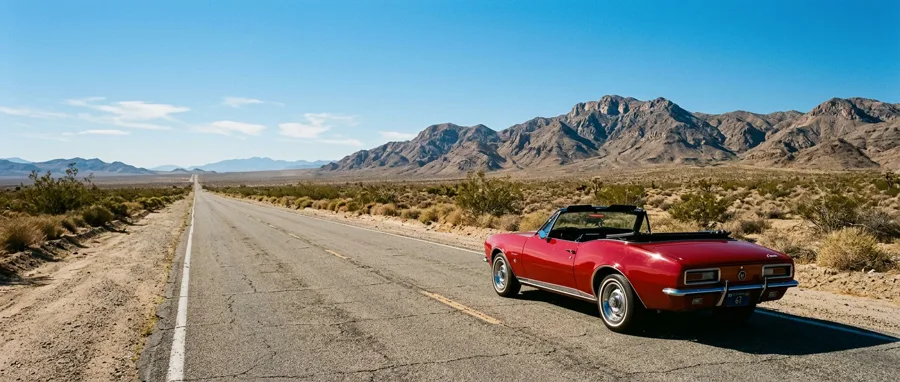
In ChatCut, Flash takes the same inputs as Kling 4.0: a first frame, a last frame, up to 10 images in all and up to 5 reference videos, 20 seconds of video in total. Here is one image, and what Flash made of it.

One image, brought to life

Start from a still. The clip opens on the parked red convertible, then it pulls away down the desert highway and the camera rises into a high aerial as the car shrinks into the distance. A 21:9 image gives a 21:9 clip; these 8 seconds cost 3.61 credits.

  1. @first_frame: Image · 21:9 @first_frame Image · 21:9
Kling 4.0 Flash · 21:9 · 8s · 720p · first frame
See the prompt

Start on @first_frame. The red vintage convertible starts up and pulls away down the empty desert highway toward the mountains, a thin trail of dust behind it; the camera rises and swings into a high aerial that follows the car as it shrinks into the distance under a clear blue sky. Sound: an old engine turning over and revving, tyres on asphalt, wind. No text, no other vehicles, no people visible.

Same prompt, Kling 4.0 Flash and Kling 4.0

Three prompts from the Kling 4.0 page, sent to Flash at 720p; the Kling 4.0 takes are 1080p. Each 10-second Flash take cost 4.52 credits, against about 11.28 on Kling 4.0 at 1080p, or 7.54 at 720p.

Wolf on a snow plain

Both wolves run at the camera through spraying snow. Kling 4.0 kept the cold blue-hour light the prompt asks for; Flash put the low sun on the horizon, lit the scene warmer, and its wolf runs right past the lens and away.

Kling 4.0 Flash 16:9 · 10s · 720p
Kling 4.0 16:9 · 10s · 1080p
See the prompt

Blue hour on a snow-covered plain, the last orange light low on the horizon behind. A lone grey wolf runs through deep powder snow toward and past the camera, filmed in slow motion with a long lens that tracks it smoothly; snow sprays from each stride and its breath shows as backlit vapour; fur is rim-lit orange against the cold blue landscape. High contrast, cold teal shadows, shallow depth of field, wildlife film look. Sound: muffled paws in snow, steady breath, wind. No people, no other animals, no text.

Runner at sunrise, 21:9

Both are native 21:9 and follow the move: track alongside, then swing to the front. Flash's 720p frame is 1464 × 628; Kling 4.0's 1080p frame is 2200 × 940.

Kling 4.0 Flash 21:9 · 10s · 720p
Kling 4.0 21:9 · 10s · 1080p
See the prompt

Ultra-wide shot at sunrise on a dirt ridge road above the sea. A runner in a grey long-sleeve top runs right to left, rim-lit in gold by the low sun. The camera tracks alongside, swings around to a front-facing medium shot, then rises to reveal the coastline and mist. Anamorphic look, gentle flare. Sound: footsteps on gravel, steady breathing, wind, distant surf. No text, no other people.

Lava reaching the sea

Both fly low over cracked crust and rise to show the flow meeting the sea under the stars, in the two colours the prompt asks for: molten orange and blue-black.

Kling 4.0 Flash 16:9 · 10s · 720p
Kling 4.0 16:9 · 10s · 1080p
See the prompt

Night on a volcanic coast. A river of glowing orange lava crawls over black rock and pours into the sea, throwing up towers of white steam lit orange from below. The camera flies low and forward over the cooling crust, close enough to see cracks opening and bright lava beneath, then rises slowly to reveal the whole flow meeting the dark ocean under a deep blue sky with stars. High contrast, only two colours: molten orange and deep blue-black. Smooth aerial movement, fine grain. Sound: a low roar, hissing steam, rock cracking, distant surf. No people, no boats, no text.

One take: 15 seconds on Flash, 30 on Kling 4.0

Not the same length. Flash stops at 20 seconds, so we cut Kling 4.0's 30-second prompt down to 15 seconds and three segments. Both follow him from the market up the stairs to the rooftop and the skyline without a cut. Flash's take cost 6.77 credits; the 30 seconds at 1080p on Kling 4.0 cost 33.84.

Kling 4.0 Flash 16:9 · 15s · 720p · one take
Kling 4.0 16:9 · 30s · 1080p

Where Flash fits

Kling pitches Flash at quick iteration and short-form video.

Drafts before the 1080p take

Check the move and the framing for 4.52 credits a 10-second take, then send the prompt that works to Kling 4.0.

Stills brought to life

Start from a product shot or a location photo; the clip keeps the image's shape.

Longer social clips

Up to 20 seconds in one take at 720p, in 16:9, 9:16 or 1:1.

Start from a skill

Kling 4.0 Flash makes the shot. ChatCut skills plan the rest of the video, from the shot list to captions and music, on the same timeline.

Flash next to the other Klings

Kling 4.0 Flash, Kling 4.0 and Kling 3.0 in ChatCut, with Seedance 2.5 Flash for scale. Credits are ChatCut's prices on November 20, 2026.

Flash next to the other Klings
Compared on Kling 4.0 FlashKling 4.0Kling 3.0Seedance 2.5 Flash
Length 3–20s3–30s3–15s4–30s
Resolution 720p720p or 1080p720p or 1080p480p or 720p
References 10 images, frames included; 5 videos, 20s in all10 images, frames included; 5 videos, 30s in all7 images, frames included; no video10 images, 5 videos, 5 audio clips
Sound Always on, no audio referencesAlways on, no audio referencesAlways on, no audio referencesYes, takes audio references
Credits per second 0.45 at 720p0.75 at 720p, 1.13 at 1080p0.60 at 720p, 0.81 at 1080pAbout 0.71 at 720p
10s clip 4.52 credits at 720p7.54 at 720p, 11.28 at 1080p6.05 at 720p, 8.06 at 1080p7.14 credits at 720p
Best for Drafts and short clips at 720pFinished shots, 1080p, up to 30sShort 1080p clips from text or imagesClips up to 30s with audio references

Pick the Kling that fits the shot

All three sit in the same model menu. Draft on Flash, finish on 4.0.

Full model

Kling 4.0

The one to finish on. The longest single clip in ChatCut, 21:9 output, and up to 10 images plus 5 reference videos in one request.

  • 3–30s
  • 720p · 1080p
  • from 0.75 credits/s
About Kling 4.0

Drafts · this page

Kling 4.0 Flash

Check the move and the framing before you pay for the full model. 720p only, 40% cheaper than Kling 4.0 at 720p.

  • 3–20s
  • 720p
  • 0.45 credits/s

Short clips

Kling 3.0

Still a good pick for a 15-second social clip from text or up to 7 images.

  • 3–15s
  • 720p · 1080p
  • from 0.60 credits/s
About Kling 3.0

Generate AI Videos With Full Editing Control

Generate video from text, images, or a first and last frame, then edit, caption, voice, and score it, all in one place.

Download Desktop Download for macOS Download for Windows Generate a video

Image to video

First & last frame

Camera moves

AI voiceover

AI music

Captions

Motion graphics

Subscribe to get your AI video editor

Unlock member features, models, and export allowances. Get more credits every month

Starter

$21 /month $25

Billed annually · $252

16% off
Get started
  • 100 credits / month
  • 41 Seedance 2.5 videosIllustrative new-user estimates, not guaranteed amounts or your quote. Each example spends all credits on one model. Video and image examples use the prompt “A red circle on a plain white background.” with no reference media; images use PNG. Actual costs vary with settings and generated tokens.
  • 588 Nano Banana 2.1 imagesIllustrative new-user estimates, not guaranteed amounts or your quote. Each example spends all credits on one model. Video and image examples use the prompt “A red circle on a plain white background.” with no reference media; images use PNG. Actual costs vary with settings and generated tokens.
  • AI editing for ~5 projectsEstimated from typical use. Projects aren't limited, and credits vary with project complexity. Editing through external agents like Claude Code or Codex uses no credits, but generating content still does
  • Parallel: 2 videos, 4 images
  • Create 1 voice clone, 1 avatar
  • Extra credit discount
  • Access to all AI modelsIncludes the most advanced models: Seedance 2.5, Kling 4.0, GPT Image 2.6, Nano Banana 2.1, music and voice generation
  • Full AI editing and video editor
  • 4K video export
  • Transparent MG export

Plus

$38 /month $50

Billed annually · $456

24% off
Get started
  • 200 credits / month
  • 82 Seedance 2.5 videosIllustrative new-user estimates, not guaranteed amounts or your quote. Each example spends all credits on one model. Video and image examples use the prompt “A red circle on a plain white background.” with no reference media; images use PNG. Actual costs vary with settings and generated tokens.
  • 1,176 Nano Banana 2.1 imagesIllustrative new-user estimates, not guaranteed amounts or your quote. Each example spends all credits on one model. Video and image examples use the prompt “A red circle on a plain white background.” with no reference media; images use PNG. Actual costs vary with settings and generated tokens.
  • AI editing for ~10 projectsEstimated from typical use. Projects aren't limited, and credits vary with project complexity. Editing through external agents like Claude Code or Codex uses no credits, but generating content still does
  • Unlimited parallel generations
  • Unlimited voice clones, avatars
  • Extra credits 10% off
  • Access to all AI modelsIncludes the most advanced models: Seedance 2.5, Kling 4.0, GPT Image 2.6, Nano Banana 2.1, music and voice generation
  • Full AI editing and video editor
  • 4K video export
  • Transparent MG export
Most popular

Pro

$72 /month $100

Billed annually · $864

28% off
Get started
  • 400 credits / month
  • 164 Seedance 2.5 videosIllustrative new-user estimates, not guaranteed amounts or your quote. Each example spends all credits on one model. Video and image examples use the prompt “A red circle on a plain white background.” with no reference media; images use PNG. Actual costs vary with settings and generated tokens.
  • 2,352 Nano Banana 2.1 imagesIllustrative new-user estimates, not guaranteed amounts or your quote. Each example spends all credits on one model. Video and image examples use the prompt “A red circle on a plain white background.” with no reference media; images use PNG. Actual costs vary with settings and generated tokens.
  • AI editing for ~20 projectsEstimated from typical use. Projects aren't limited, and credits vary with project complexity. Editing through external agents like Claude Code or Codex uses no credits, but generating content still does
  • Unlimited parallel generations
  • Unlimited voice clones, avatars
  • Extra credits 15% off
  • Access to all AI modelsIncludes the most advanced models: Seedance 2.5, Kling 4.0, GPT Image 2.6, Nano Banana 2.1, music and voice generation
  • Full AI editing and video editor
  • 4K video export
  • Transparent MG export
Lowest credit price

Max

$141 /month $200

Billed annually · $1692

30% off
Get started
  • 800 credits / month
  • 329 Seedance 2.5 videosIllustrative new-user estimates, not guaranteed amounts or your quote. Each example spends all credits on one model. Video and image examples use the prompt “A red circle on a plain white background.” with no reference media; images use PNG. Actual costs vary with settings and generated tokens.
  • 4,705 Nano Banana 2.1 imagesIllustrative new-user estimates, not guaranteed amounts or your quote. Each example spends all credits on one model. Video and image examples use the prompt “A red circle on a plain white background.” with no reference media; images use PNG. Actual costs vary with settings and generated tokens.
  • AI editing for ~40 projectsEstimated from typical use. Projects aren't limited, and credits vary with project complexity. Editing through external agents like Claude Code or Codex uses no credits, but generating content still does
  • Unlimited parallel generations
  • Unlimited voice clones, avatars
  • Extra credits 20% off
  • Access to all AI modelsIncludes the most advanced models: Seedance 2.5, Kling 4.0, GPT Image 2.6, Nano Banana 2.1, music and voice generation
  • Full AI editing and video editor
  • 4K video export
  • Transparent MG export

Free

$0No credit card required

  • Free credits at signup
  • Full video editor
  • Unlimited local export
  • AI captions and transcription
  • Motion graphics
  • 1 voice clone with preview
Try for free

Some features are completely free in Codex, Claude, and WorkBuddy. Learn More

Kling 4.0 Flash FAQ

What is Kling 4.0 Flash?

The faster, cheaper version of Kling 4.0, Kuaishou's video model. Kling made it for quick iteration and short-form video: 3 to 20 second clips at 720p, with sound, from the same kinds of input as Kling 4.0. Kling says it generates significantly faster than Kling 4.0 but gives no figure.

When was Kling 4.0 Flash released?

Kling opened Flash to its Ultra Yearly subscribers on September 28, 2026, before the full Kling 4.0, which Kuaishou launched on October 15. Flash has since opened to everyone on the Kling AI website and API, and it's in ChatCut today.

Is Kling 4.0 Flash available in ChatCut?

Yes. Pick Kling 4.0 Flash in Video Gen on the web editor or ChatCut Desktop; the ChatCut Agent can use it too. Every Flash clip on this page was made that way.

How much does Kling 4.0 Flash cost in ChatCut?

On November 20, 2026, Flash cost about 0.45 credits a second at 720p: 2.26 credits for 5 seconds, 4.52 for 10 and 6.77 for 15. Kling 4.0 costs 0.7536 a second at 720p (7.54 for 10 seconds) and 1.128 at 1080p (11.28), so Flash is 40% less at the same resolution. Reference videos add billed seconds. The editor shows the exact estimate before you send.

Kling 4.0 Flash or Kling 4.0: which should I use?

Draft on Flash, finish on Kling 4.0. Flash is enough to check the motion, framing and timing of a shot, or for short social clips at 720p. Choose Kling 4.0 when you need 1080p, a clip longer than 20 seconds, or keyframes between the first and the last frame. Flash is a separate model, so the Kling 4.0 take of the same prompt will differ.

What length and resolution does Kling 4.0 Flash support?

3 to 20 seconds in one clip, in whole seconds, at 720p only: 1280 × 720 at 16:9 and 1464 × 628 at 21:9. It also makes 9:16 and 1:1. Kling lists Flash as 8-bit SDR. For 1080p or up to 30 seconds, use Kling 4.0.

What inputs does Kling 4.0 Flash accept?

In ChatCut, the same kinds as Kling 4.0: text, a first frame, a last frame, reference images and reference videos, combined in one request. Up to 10 images in all, frames included, and up to 5 videos of 3 to 20 seconds each, 20 seconds in total. Name each one in the prompt, such as @first_frame, @image_1 or @video_1. Flash takes no audio references.

Can Kling 4.0 Flash turn an image into a video?

Yes. Give it a first frame and describe the motion; the clip takes the image's shape, so the 21:9 convertible photo on this page gave a 21:9 clip. Kling's own guide says Flash on kling.ai doesn't take start and end frames; in ChatCut it takes both.

Does Kling 4.0 Flash generate sound?

Always. As on Kling 4.0, there is no switch for it, so describe the dialogue, effects and music you want in the prompt. It takes no audio references; add your own voice or music on the timeline afterward.

How does Kling 4.0 Flash compare with Seedance 2.5 Flash?

Both are the cheaper versions of their family's newest model. In ChatCut on November 20, 2026, a 10-second 720p clip cost 4.52 credits on Kling 4.0 Flash and 7.14 on Seedance 2.5 Flash. Seedance 2.5 Flash runs up to 30 seconds, adds 480p and takes audio references; Kling 4.0 Flash stops at 20 seconds and makes 720p only.

Do I need a paid plan?

Yes. Video generation in ChatCut needs a paid plan, and each clip uses credits. The editor shows the estimate before you send.

Choose your platform